Rates
Set up your practice rates for care that is not covered by insurance.Overview
In Flux, you manage the rates you charge patients yourself for care that is not covered by their health insurance. This can be, for example, non-contracted treatments or additional services.
Managing rates in one place keeps invoicing clear and consistent across your practice. Flux applies the rates automatically when it creates invoices, which avoids manual entry and mistakes.
Set up rates
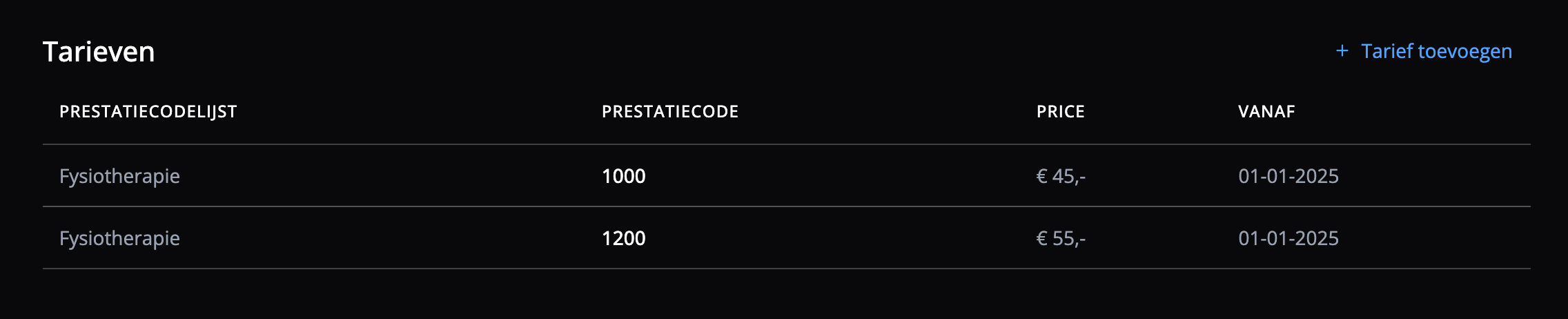
To create or change rates, go to Settings → Prices: click the cog in the left menu and select Prices under Invoices.
Administrators can add, change and delete rates:
- Performance code
- Rate
- Period
Create a rate
To create a rate:
- Click + Add rate
- Enter the following information:
- Performance code
- Rate
- Period
- Click Create
The rate is active and is used when you create invoices.
Change a rate
To change an existing rate, select it and click Edit. A window opens in which you can change the rate.
Delete a rate
To delete a rate, select it and click the bin. A confirmation appears with which you delete the rate permanently. Deleting a rate cannot be undone.
- Once you delete a rate, it can no longer be used for invoicing. You can still select the performance code when you draw up an invoice, but it has no rate.
- You can always add the rate again.
Frequently asked questions
Frequently asked questions about rates in Flux.
What happens to existing invoices when I change a rate?
Existing invoices always keep the rate they were created with. New invoices use the rate that applies on the invoice date.
Can I set rates per year?
Yes. Enter a start and end date when you create a rate. Flux picks the right rate based on the date of the treatment or invoice.
Can I set different rates per location or practitioner?
Rates currently apply to your whole organisation. If you work with different price lists, you can use separate performance codes, through products, to tell them apart.