Appointment types
Create appointment types to organise the different kinds of care and appointments in your practice.Overview
With appointment types you set up the calendar the way that suits your practice or clinic. You can distinguish between different, specific kinds of care and products. Every appointment type has its own duration, colour and invoicing logic, so scheduling stays clear and invoices and claims are created correctly.
When appointment types are linked to the right healthcare services and products, Flux works out the right entitlement and service code(s) automatically when you schedule an appointment. That saves time, avoids manual lookups and reduces the chance of mistakes in your claims.
Setting up appointment types
To open the appointment type settings, go to Settings → Appointment types: click the gear icon in the left menu and select Appointment types under Appointments. This is where you manage all your appointment types.
Administrators can add and delete appointment types, and change their details:
- Name
- Duration
- Explanation
- Calendar colour
- Treatment type
- Claims and/or product invoicing
- Location(s)
- User labels
- Additional information for online scheduling and appointment reminders

Adding an appointment type
To add an appointment type:
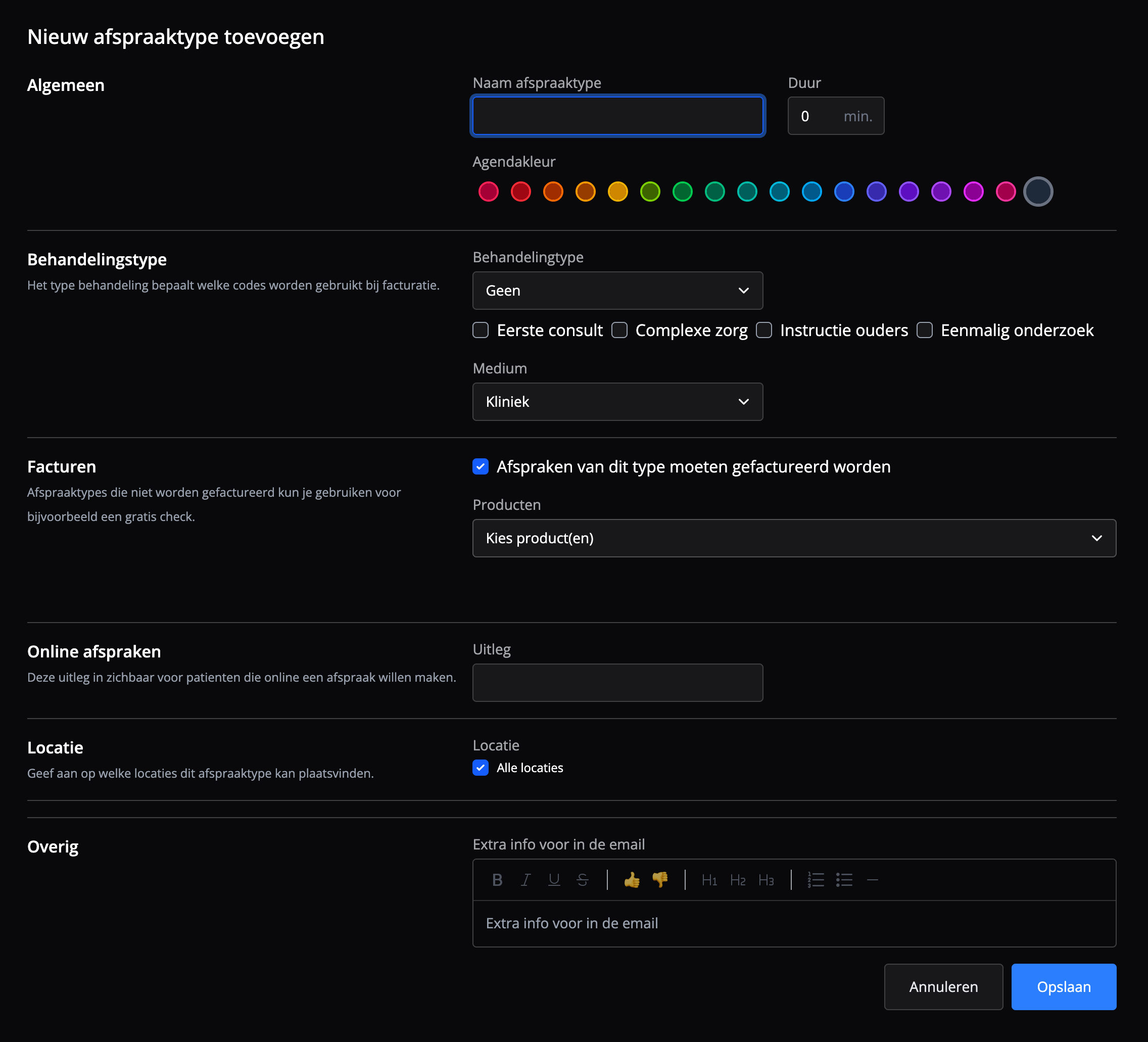
- Click + Add new appointment type in the top right corner.
- Select or enter the following information:
- Appointment type name *
- Duration *
- Explanation
- Calendar colour
- Treatment type
- No-show product
- Products
- Location
- User label
- Additional info for the email
- Click Save.
The appointment type is created and you can use it right away to schedule appointments.
Note: fields marked with a red asterisk (*) are required.
Editing an appointment type
To change an appointment type, click the ellipsis (⋯) and then Edit. You can change all details and settings of the appointment type.
Deleting an appointment type
To delete an appointment type, click the ellipsis (⋯) and then Delete. After you confirm, the appointment type disappears from the list.
In Flux, deleting works like archiving: you can no longer use the appointment type for new appointments, but everything already scheduled with it is kept. This means you can safely clean up your list of appointment types, for example when a colleague who has left had an appointment type of their own.
What changes
- The appointment type disappears from the list under Appointment types.
- You can no longer choose it when you schedule or edit an appointment.
- Patients can no longer book it online.
What stays the same
- Existing appointments keep their appointment type, both past and future ones. You still see the appointment type in the calendar.
- You can still invoice these appointments and submit claims for them, with the products and services of the deleted appointment type.
- For appointments with a package, credits are deducted as the deleted appointment type was set up.
- In Analysis, appointments with the deleted appointment type still count. The appointment type is marked as deleted there. Your statistics about past appointments stay correct.
Before you delete
- Future appointments: check whether appointments with this appointment type are still scheduled. They keep the deleted appointment type. If you want to give them a different appointment type, edit them. After that, you can't switch back to the deleted appointment type.
- Availability: if the appointment type is still part of an availability block, it shows there with the message Appointmenttype is deleted. Remove it there to keep your availability tidy.
Linking appointment types to service codes
The treatment type is the basis for the codes Flux uses for invoicing. The service code(s) (prestatiecodes) used for claims are calculated automatically from the combination of:
- Treatment type (e.g. physiotherapy, dietetics, ...)
- Additional characteristics (First consult, Complex care, Parent instruction, One-time examination), and
- Medium (Clinic, House call, Online)
Flux uses this combination to determine the matching service code according to the Vektis claims standards.
Frequently asked questions
Frequently asked questions about managing appointment types in Flux.
Can I delete the appointment type of a colleague who has left without losing my statistics?
Yes. Appointments that were already scheduled with this appointment type keep it. They stay visible in the calendar, you can still invoice them and submit claims for them, and they count in Analysis. You just can't use the appointment type for new appointments anymore.
Can I restore a deleted appointment type?
No. You can add a new appointment type with the same settings, but that is a separate appointment type. Analysis does not merge the old and the new appointment type.