New calendar
The calendar has a new layout. Every appointment has a new card that shows its status at a glance. You scroll sideways through the days, collapse both sidebars and choose which hours you see, the contrast, the grid lines, the weekends and whether patient names are visible. This cycle we also fixed over fifty issues, from invoicing to integrations.
Appointment cards
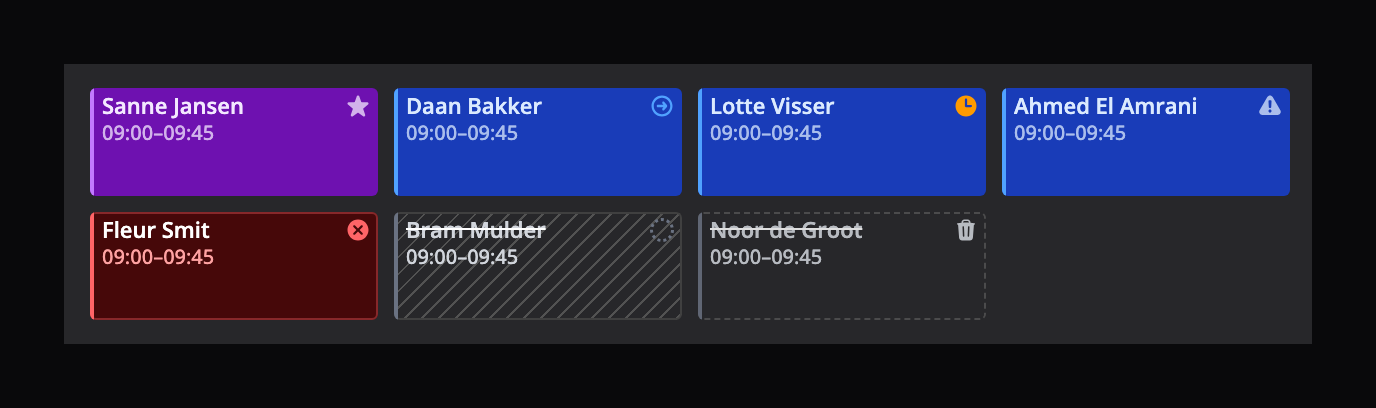
The name sits at the top of the card, the time below it, and a narrow bar on the left shows the appointment's colour. Markers sit in the top right, together with the status icon once an appointment has moved past booked. A short appointment fits on a single line.
A cancelled appointment is hatched and struck through, a deleted one has a dashed outline and is struck through, and a no-show is red. Status icons look the same everywhere in Flux.
In the Week and 2 Weeks views the columns are narrow. There the card keeps the status icon, the time and the markers in view first, and leaves out the name when there is no room for it.
New on the card:
- Patient's first appointment: a star on a patient's first appointment, so the front desk can give that patient extra attention.
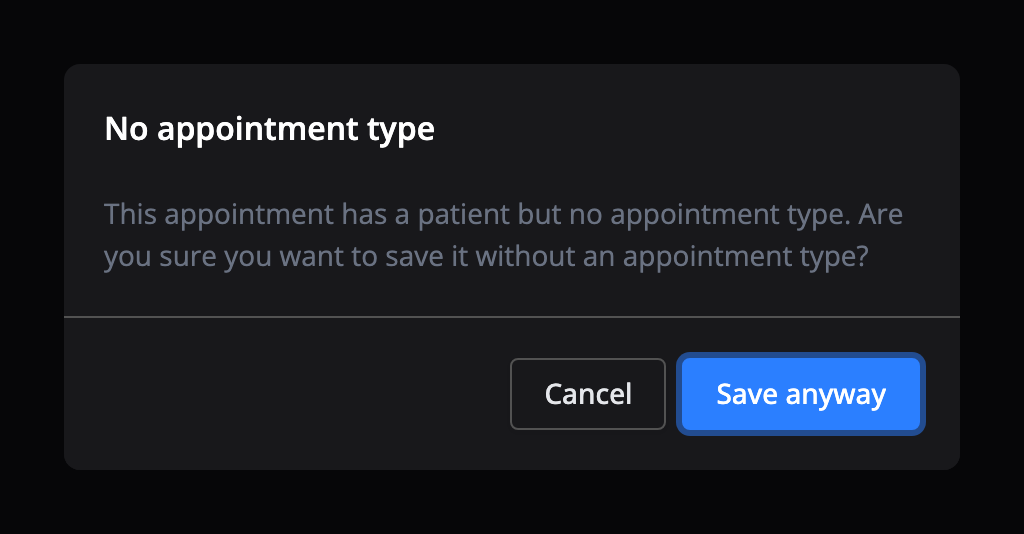
- No appointment type selected: a warning icon on an appointment with a patient but no appointment type. When you save one, Flux asks if you are sure. 'Save anyway' goes ahead.
- Running late: a new status for a patient who has let you know they will be late.
Dragging appointments is smoother, and the calendar responds straight away to the first click, scroll or drag after opening.
Continuous
Next to Day, Week and the other views there is now Continuous. You scroll sideways through the days instead of paging week by week. The day header with week numbers stays at the top.
The Day view now scrolls sideways too when you select many practitioners. Columns no longer get so narrow that appointments become unreadable.
Full screen
You can now collapse the left sidebar too, with the arrow at the left of the header or with [. Collapse the right panel as well, with ], and the calendar fills the whole screen. Flux remembers your choice on this device.
Display
Under Display above the calendar:
- Privacy mode: the card shows the appointment type instead of the patient's name, without birthday and description. For when a patient can see your screen.
- Weekends: hide Saturday and Sunday in the Week, 2 Weeks and 5 Days views. If a hidden weekend holds appointments, a narrow column shows how many. Click it to show the weekend. With 'Start on today' on, the 5 Days view now moves exactly five days, without skipping any.
- Show availability: turn off the available times and locations above the columns.
In your profile, under Calendar settings, you set the visible hours. The calendar then shows only those hours, so you no longer scroll past the night. If an appointment falls outside them, the calendar extends so you still see it. To change the hours on one device, use 'Day starts at' and 'Day ends at' under Display.
Under Settings → User → Display you turn on High contrast. Grid lines, off-hours shading, column headers, free slots, appointments, location strips and the current-time line then become easier to see. Only the calendar changes, and the setting applies on this device.
Also in your profile, Grid lines sets how often a line is drawn in the calendar: every hour, or every 30, 15 or 10 minutes.
New (16)
- New appointment cards with clear statuses
- Continuous view: scroll sideways through the days
- High contrast for the calendar schedule
- Privacy mode that hides patient names in the calendar
- Hide weekends in the Week, 2 Weeks and 5 Days views
- Collapse the left sidebar, for a full-screen calendar
- Running late status for an appointment
- Marker for a patient's first appointment
- Warning for an appointment with a patient but no appointment type
- Visible hours: the calendar shows only the hours you set
- Grid lines every hour or every 30, 15 or 10 minutes
- A profile page for every user, through 'My profile' or 'View profile'
- Send PREMs in bulk for treatment processes that can still have one
- SIRSI questionnaire
- FABQ can be sent as a questionnaire
- Red flags specific to speech therapy
Shortcuts (4)
- P turns privacy mode on or off
- [ collapses or expands the calendar's left sidebar
- ⌘ + [ collapses or expands the sidebar with the main menu (Ctrl + [ on Windows or Linux), instead of [; this also works while you are in a text field
- When you click an appointment, the arrow keys carry on from that appointment's day
Improvements (35)
- Availability and locations above the calendar can be turned off
- More space between the top bar and the calendar header
- A faster calendar: less memory and smoother dragging
- Closed treatment processes no longer show up when choosing one for a later appointment
- Appointments in the calendar feed (.ics) are marked as private
- A chosen patient shows in the appointment form straight away
- A patient's appointment overview loads faster
- Better and faster patient name search
- The patient's phone number on worklist items for an open treatment process without an appointment
- The close action was removed from the worklist
- Filter the medical feed on favourites
- Diagnosis codes on the body location
- Admins can edit treatment plan templates
- A default responsible practitioner for a treatment process
- Updated PREM requirements
- Treatment processes without treatments are no longer sent to Nivel and LDF
- Clearer, more consistent terms throughout Flux
- Better grammar for the location placeholder in email templates
- Copy an invoice number with one click
- An overview of claims per diagnosis
- Crediting only the rejected lines of a collection invoice marks both the credit and debit invoice as handled
- The appointments table opens with the most used settings, without a default filter on appointments without an invoice
- Filter revenue on blocked appointments and treatment processes
- Filter and group on the diagnosis body location
- A companies column in patient data
- Hours in the planning analysis with one decimal
- Practitioners are sorted better on the analysis page
- An option to show appointment duration in hours
- Choose in the settings which revenue allocations are active
- Excel exports from the data explorer and Analysis are built on the server
- Mediquest login details are verified
- GDS801 validation updated to Vektis u29
- Service code list for chiropractors
- PDF document classification on a newer AI model
- Technical maintenance
Fixed (50)
- The calendar ignored the first click, scroll or drag after opening
- The 5 Days view skipped two days with 'Start on today' on and weekends shown
- Day view columns became too narrow with many practitioners
- A practitioner's pop-up in the calendar got in the way
- The tooltip on a user's avatar in the calendar stayed after a click
- The practitioner select was invisible when every user is a planner
- A planner was selected while only practitioners should be shown
- The online planner sometimes showed availability where an appointment was already booked
- A patient could appear twice in an appointment proposal
- Times and buttons in appointment suggestions were cut off
- The notification setting for appointment proposals did not work for automatically accepted proposals
- The appointment overview email could not be viewed
- The treatment count on the patient card included an intake until it was invoiced
- Resending a questionnaire did not work without a treatment process
- Placeholders were sometimes taken from the wrong update
- The consent checkbox for direct mail disappeared while it was still required to send
- An error on invalid content in the text editor
- Searching AGB healthcare professionals gave inconsistent results
- Searching the ZorgMail address book with special characters failed
- Removing a Physitrack connection failed when it was already gone
- An error processing a response to a personal data request
- An invoice was not always created when an appointment was completed
- Automatically merging invoices gave a different result than merging by hand
- Insurance coverage could be out of date after a COV check
- Invalid correction invoices counted as revenue
- A user AGB code was required on a product invoice, even when not needed
- A patient's default invoice type was not saved
- Some invoice dashboard figures were not filtered by user
- The subscription invoices tab did not load
- An error while finalising an invoice went unreported
- Yuki missed some payments
- Twinfield: errors on an expired or unreachable connection
- Mollie: errors on an unknown payment
- An error when a healthcare provider had no KvK number on a date
- The last day was cut off in some analyses
- A doctor could not open the analysis page
- Analysis data was not always updated
- Analysis data for invoice lines stopped after the first page
- Patient data in Analysis was not available offline
- Worked hours per day gave an error
- Opening a page from the login page could freeze the tab
- Features outside your plan were reachable through a direct link
- When you edited a patient from the patient list, the patient was missing from the navigation at the top
- The invitation email had no button
- A refused change on the email settings and salutation pages went unreported
- An import was recorded in a user's name instead of the system's
- A visual glitch in filters
- Typos in Flux
- User details were not refreshed properly after changing practice settings
- Several technical issues fixed